 TokenSight
A CodexBar alternative that goes deep on Codex and Claude Code
Updated October 10, 2026 · by the maker of TokenSight — we've tried to be fair to CodexBar, which is a great tool.
CodexBar is a free, open-source menu-bar app that shows your usage windows for dozens of AI providers — Codex, Claude, Cursor, Gemini, Copilot and many more — by reusing the logins you already have. If you juggle many providers and mainly want “how much is left, and when does it reset?”, it's hard to beat.
TokenSight answers a different question for the two tools most developers live in, Codex and Claude Code: where did the tokens go? Exact totals per project, session and model; which tools and MCP servers grow your context; and Insights that flag cache rebuilds, heavy startup context and long sessions — with what to change.
Choose CodexBar if…
- You want free and open source
- You use many AI providers, not just Codex and Claude
- You care mostly about remaining quota and resets
- You want provider status / incident badges
- You're on Linux too
Choose TokenSight if…
- You live in Codex and/or Claude Code
- You want to know which tools and MCP servers eat your context
- You want history: per project, session, model, request
- You'd rather not connect logins, API keys or cookies
- You want suggestions, not just a gauge
Or run both
- CodexBar for every provider's quota
- TokenSight for the why behind Codex and Claude Code usage
- They read different sources and don't conflict
TokenSight vs CodexBar, side by side
CodexBar details come from its README as of October 2026. “Not listed” means we didn't find it there.
| TokenSight | CodexBar | |
|---|---|---|
| Price | 7-day full trial, then free for the current cycle; $9.99 once for history, export and every Insight | Free, MIT open source |
| Platforms | macOS 13+ | macOS 14+, Linux desktop, CLI |
| Providers | Codex, Claude Code | 40+ (Codex, Claude, Cursor, Gemini, Copilot…) |
| How it gets data | Local session logs only — no logins, keys or cookies | Provider OAuth, API keys, browser cookies, CLIs and local files |
| Remaining quota & reset countdowns | Codex weekly; Claude 5-hour & weekly | Per provider: session, weekly, monthly |
| Exact token totals by project / session / model | Yes, with per-request inspector | Local cost scans where sources allow |
| Which tools / MCP servers grow your context | Yes | Not listed |
| Cache-rebuild, startup-overhead & long-session Insights | Yes | Not listed |
| Threshold alerts | 50 / 80 / 95 % per limit | Not listed for macOS (Linux app has desktop notifications) |
| Provider status / incidents | No | Yes |
| Credits & billing dashboards | Estimates at list prices | Credits, Admin API spend, billing summaries |
| Export | CSV & JSON | CLI output |
Why “where did it go” matters
A quota gauge tells you you're at 57% on Wednesday. It doesn't tell you that one project starts every session 46K tokens deep because of its CLAUDE.md and MCP servers, or that 35 cache rebuilds re-sent 2.9M tokens after coffee breaks. Those are the things you can actually change:
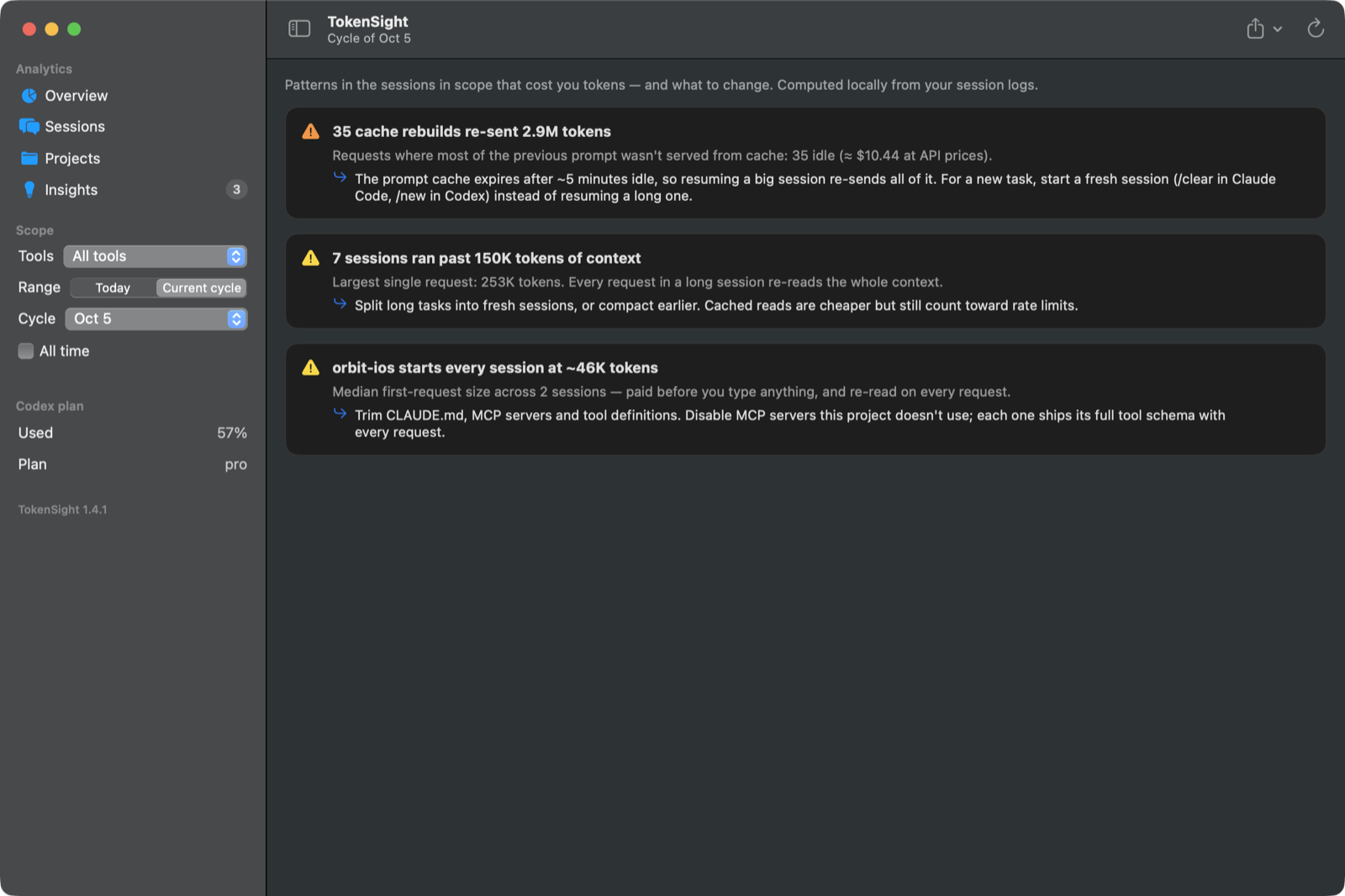
Screenshot from a demo dataset — your numbers come from your own logs, computed on your Mac.
Try TokenSight
Install it and it fills in from the Codex and Claude Code history already on your Mac. Keep CodexBar running if you use it — nothing conflicts.
Buy TokenSight — $9.99 Download free trialbrew install --cask sanv725/tap/tokensightFAQ
What is a good CodexBar alternative?
If you mainly use Codex and Claude Code and want to know where your tokens go, TokenSight is built for that. If you want limits for many providers at once, CodexBar is the broader tool — and they run fine side by side.
Does TokenSight need my Claude or OpenAI login?
No. It reads the session logs Codex and Claude Code already write on your Mac, plus (optionally) the limits Claude Code passes to your status line. No logins, API keys or browser cookies. More on privacy.
How do I see Claude's 5-hour and weekly limits?
See our guide: how to see your Claude Code usage limits.