 TokenSight
The best Claude Code usage trackers in 2026
Updated October 10, 2026 · written by the maker of TokenSight, which is one of the five. We don't rank ourselves first overall — each tool is the best pick for something different, and we've said where the others win.
Claude Code tells you about usage when you ask (/usage). These tools keep it in view: some show how much of your 5-hour and weekly limits is left, some report tokens and cost from your local logs, and one explains what's using them up. Here's how they compare.
Quick picks
Free terminal reports
- ccusage — daily, monthly, session and 5-hour block reports; JSON; many agents
Limits for every provider
- CodexBar — free menu-bar app covering 40+ AI providers
Live terminal monitor
- Claude Code Usage Monitor — real-time dashboard with forecasts and warnings
Mac + Windows, many tools
- SessionWatcher — paid native app, menu bar or taskbar
Where your tokens go
- TokenSight — Codex & Claude Code analytics, context attribution, Insights
Comparison table
Details come from each project's own README or website in October 2026. Prices and features change — check the source before buying.
| ccusage | CodexBar | Claude Code Usage Monitor | SessionWatcher | TokenSight | |
|---|---|---|---|---|---|
| Price | Free, open source | Free, MIT | Free, MIT | From $6.99 one-time | 7-day trial; free current cycle; $9.99 once |
| Form | CLI | Menu bar (+ Linux app, CLI) | Terminal UI (Python) | Menu bar / taskbar | Menu bar + dashboard |
| Platforms | Anywhere Node/Bun runs | macOS 14+, Linux | macOS, Linux, Windows | macOS 14+, Windows | macOS 13+ |
| Tools covered | Claude Code, Codex + 15 more | 40+ providers | Claude Code | Up to 20 tools | Claude Code, Codex |
| Claude 5-hour / weekly limit % | 5-hour block report | Yes | Yes (via status line) | Yes | Yes (via status line) |
| Exact tokens from local logs | Yes | Where sources allow | Yes | Yes | Yes |
| Which tools / MCP servers fill your context | — | — | — | — | Yes |
| Suggestions (cache rebuilds, startup overhead…) | — | — | Forecasts & pace | — | Insights |
| Needs logins / cookies | No | Reuses OAuth, keys or browser cookies | No | No API keys (reads local logins) | No |
“—” means we didn't find it in the tool's documentation.
1. ccusage — best free terminal reports
ccusage (free, open source) turns local session logs into daily, monthly and per-session reports with costs, plus Claude's 5-hour billing blocks with live monitoring and a status line mode. It covers Claude Code, Codex and many other agents, and every report can output JSON — ideal for scripts and CI.
Pick it if you live in the terminal or need cross-platform reports. Skip it if you want something always visible or explanations rather than tables. TokenSight vs ccusage.
2. CodexBar — best for limits across many providers
CodexBar (free, MIT) puts session, weekly and monthly windows with reset countdowns in your menu bar for 40+ providers — Codex, Claude, Cursor, Gemini, Copilot and more — plus credits, spend dashboards and provider status badges. It gets data by reusing your existing logins (OAuth, API keys, browser cookies, CLIs).
Pick it if you use many AI providers and mainly want “how much is left”. Skip it if you'd rather not connect logins, or want to know what used the tokens. TokenSight vs CodexBar.
3. Claude Code Usage Monitor — best live terminal monitor
Claude Code Usage Monitor (free, MIT, Python) is a real-time terminal dashboard for Claude Code with burn-rate forecasts and warnings. Version 4 reads Claude Code's official limits from the status line and labels numbers as official or estimated, with optional long-term history and CSV/JSON reports.
Pick it if you keep a terminal pane open while you work and want predictions. Skip it if you also use Codex or want a native app.
4. SessionWatcher — best paid tracker for Mac and Windows
SessionWatcher is a native menu-bar (Mac) and taskbar (Windows) app that shows limits, tokens and costs for up to 20 tools, with alerts and widgets. It's sold one-time: Solo (one tool) from $6.99, a Claude/Codex/Cursor bundle and a Pro tier for all tools, with longer history on Pro.
Pick it if you're on Windows, or want one paid app across many tools. Skip it if you need history beyond its tier or per-tool context detail.
5. TokenSight — best for understanding where your tokens go
TokenSight (ours) is a native Mac app for Codex and Claude Code. Besides limits in the menu bar (Codex weekly; Claude 5-hour and weekly, with alerts), it shows exact token totals by project, session, model and request; which tools and MCP servers grow your context; and an Insights page that flags cache rebuilds, heavy startup context and long sessions — with what to change. It reads only local files: no logins, keys or cookies.
Pick it if you use Codex and/or Claude Code on a Mac and want to cut what you burn. Skip it if you're on Linux or Windows, or need providers beyond those two.
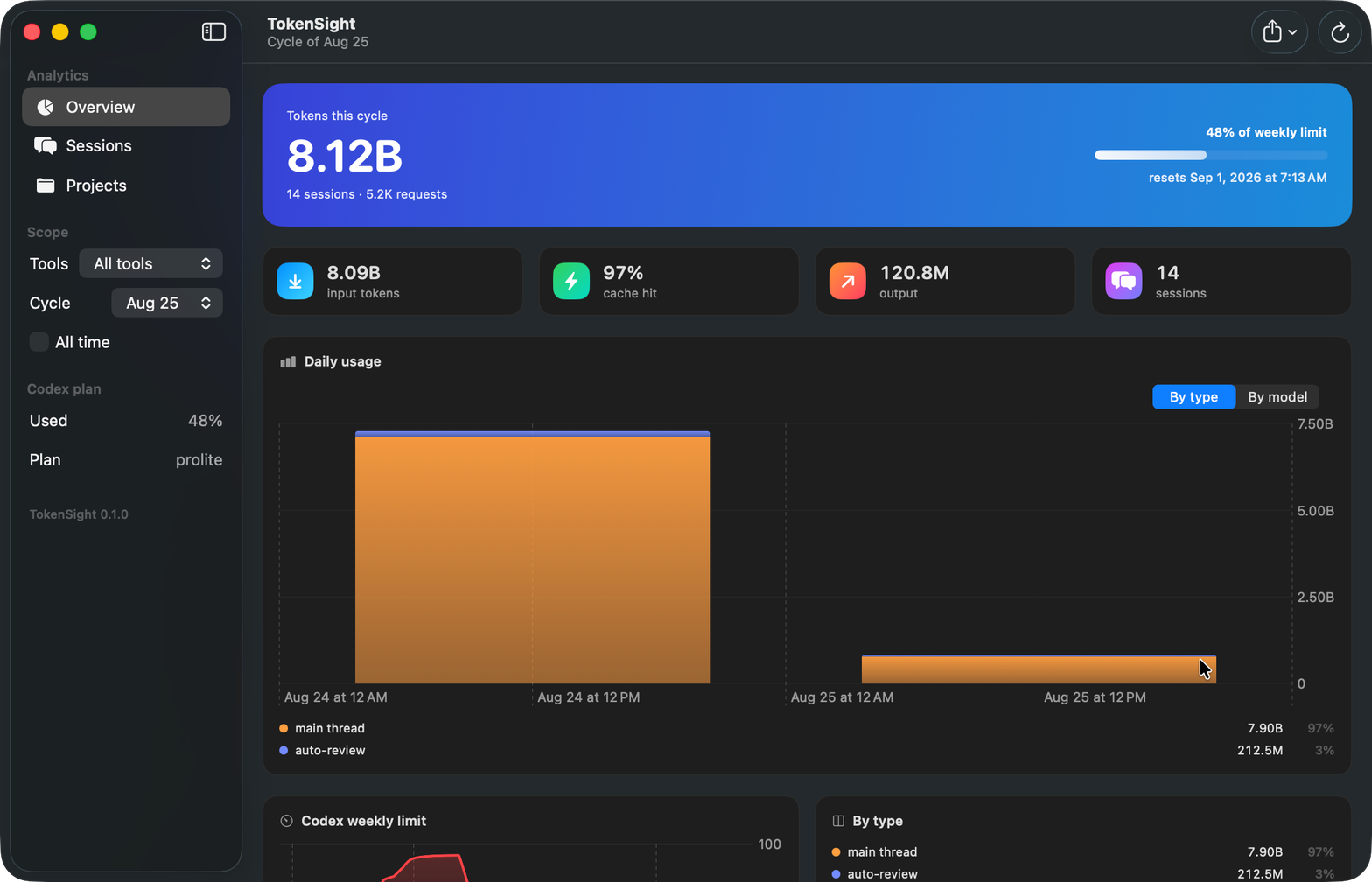
Demo dataset.
How we compared
We read each tool's README or website in October 2026 and listed what they document. We haven't benchmarked accuracy across tools, so the table compares features, not numbers. If something here is wrong or out of date, email support@tokensight.app and we'll fix it.
brew install --cask sanv725/tap/tokensight